💻
Product
LexIQ is an testing automation platform with 10,000+ users. It is used for sales operation enterprise teams. This software tool helps corporations automate testing and validating processes/ workflows so that the CRM and reporting tools they rely on are working correctly and meeting business requirements to generate leads.
The Admin Team has two roles. They assist all users in navigating the platform and review inputs that come in from the virtual assistant in the conversation touchpoint Help Center. The more information put into the LLM, the more the model learns. However, human teams need to review personally identifiable information (PPI) such as customer data like credit cards, billing information, invoices, NDA contracts, renewals and clauses, lead and opportunity information with large contracts, property and patent information, competitive analysis, etc. LLMs are not always secure and there are risks associated with unintended exposure of information and making biases when contextually judging sensitive and confidential information.
Problem statement
New users onboarding to the LexIQ platform are constantly confused about the functionality and application usage of the platform to help generate sale leads. They feel there is not enough help within the application and get frustrated. There are about 20 new users onboarding each week.
The Admin Team of 20 is overwhelmed and bombarded with requests, getting an average of 70 requests a day from users to help with basic needs. This deviates from the time that can be spent working on fixing development issues within the internal platform such as reviewing and copying over 600-2,000 files a day into the LexIQ platform for LLM and NLM prompting to summarize and classify CRMs. Admins need to manually review content before generating reports to ensure Sales agents operate with governance and reliability, prevent malicious inputs, comply with General Data Protection Regulation (GDPR), and iterate flaws in user typos and voice data. *Quantitative data taken from interviews/ surveys with Admin during the research process below.
95% of new users immediately go to the Admin before trying to solve how to use the platform.
Consequences
Poor UX means that there is more time that has to be dedicated to training, support, and operational costs. On average, the Admin Team gets an average of 70 requests a day among the 20 teammates. Each user can spend about an average of 1.5 hours on each question. A whole entire workday can be filled just answering Help Center-related questions, having employees work overtime or not be able to fulfill LLM requests.
With 260 workdays a year, with an 8-hour workday or 2,080 hours in a year and an admin’s salary is $40 an hour, LexIQ spends $83,200 per person or $1,664,000 a year for their team of 20 in salaries.
If we calculate the time spent on basic admin tasks, 70 requests a day x 1.5 hours = 105 hours a day x 260 days =27,300 hours a year x $40 per hour, then we calculate $1,092,000 spent a year on help center costs.
65.7% of the total salary is spent on answering basic platform questions. We want to eventually have that cut down to less than 10%.
*Quantitative data estimated from interviews/ surveys with Admin during the research process below.
Design Flaw
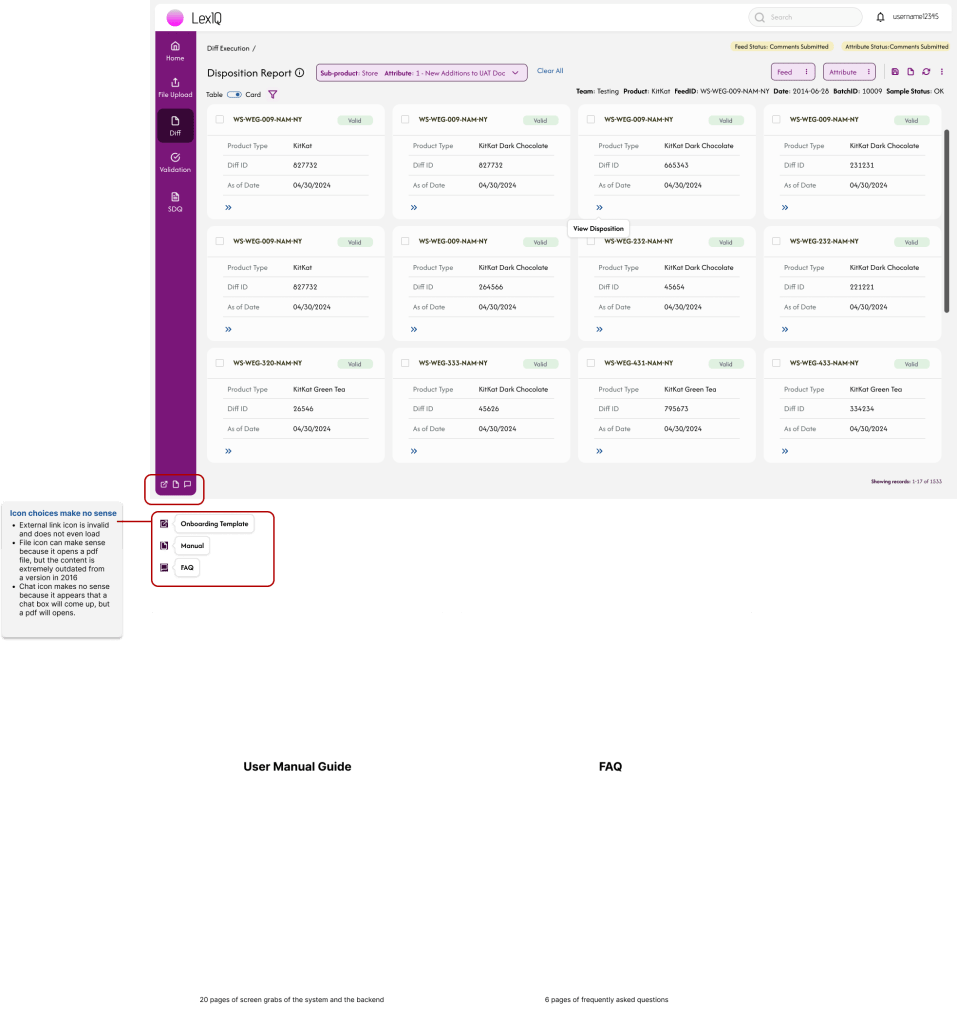
Users currently have to scan through documents that are outdated from new product design updated and versions released. It takes too much time for users to navigate through external resources like Confluence, GoogleDocs, and Slack to learn about LexIQ. They experience decreased adoption or not enthusiastic, causing frustration. LexIQ could be underutilized and reduce value from an investment perspective, or worse, no more adoption.
Solution
Create a Help Center page with simplified UI to encourage users to be able to understand technical terms, the purpose of the platform and users types, and workflows with little-to-no assistance from Admin helping. This will give the Admin team more time to work on LLM-related tasks rather than assisting users every moment.
Research Part 1
I started the design process by researching what resources users currently had. I documented the workflow which consisted of logging into the application and clicking on one of the three icons at the bottom of the navigation menu bar. I then sent out surveys to the Admin which was able to help me come up with a problem statement and consequences.
- I interviewed the Lead Admin user and asked a series of questions to place in the project brief since these leaders are the ones in charge of this flow:
- Who uses the platform and what is every user title?
- Testing team leads (business heads; general users; product processors: warehouse testers, source teams, data management team, business test coordinator, management leads; delegates; support teams)
- What part of the product/ experience does the help center work impact?
- Entire flow, viewing and editing files, signing up, understanding technical terms throughout platform
- How does this project relate to larger company goals?
- Reduces manual effort by the admin. Save time = scalability and profitability. There will be a reduction in service admin request volumes with a center for more clarity.
- How many requests do you get a week?
- 70 average
- How long do requests take to settle with users?
- 5 mins to 3+ hours (rare), but average of 1.5 hours
- How many users are in the platform?
- 10,000+
- What do you measure to determine success?
- No escalations and problems resolved quickly
- Can we tie a dollar value to this?
- $40/hr salary
- How often are we getting new users?
- 5-20 new users a week
- What is the problem you are experiencing and who is affected by it?
- Internal users, onboarding teams, admin, and general users
- Where does this problem occur?
- Onboarding new users to the platform for the first time
- Why does the problem occur?
- Documentation is outdated and not easy to comprehend
- Why is the problem important?
- Admin will risk user deviating from tasks in an effective way and waste time. Retention of users will not be high. Lose clients.
- Who uses the platform and what is every user title?
- I surveyed six of the Admin (+answers below)
- How many requests do you get on average a week?
- About 625
- How many requests are related to basic issues?
- More than half
- How long does it take you to answer requests on average? (Example of answer: Onboarding requests takes 60% of my time and each request takes 3 hours to complete.)
- 1.5 hours average each request
- 30 mins – 5 hours to help users onboard
- 30+ mins to help troubleshoot
- What are your day-to-day tasks?
- Analyzing failures of reports for new users
- Onboarding
- Monitoring jobs
- Helping upload feeds
- Setting up users
- Anything else you want to add?
- UI/UX needs to improve
- How many requests do you get on average a week?
Because of (1) the lack of resources for users to utilize, (2) the amount of detailed qualitative and quantitative information given to me by the Admin, and (3) the lack of an actual Help Center landing page, I did not interview the general users until a wireframe was complete. I felt like this approach allowed users to provide feedback on something tangible, ensuring their input was grounded in a clearer understanding of the product experience versus just pdfs.
Research Part 2
After sending out the survey and interviewing the lead Admin user, I went into the platform and (1) documented the current workflow then (2) had a white boarding session that included every theme and section within the document in sticky notes. I even included paths to links that were attached to the pdfs and photo references that were included. I then I started to compare the topics and realized there were already 10 topics repeated twice which was unnecessary. I highlighted these and made comments on how we can combine them and where to potentially place them to align with the user needs.
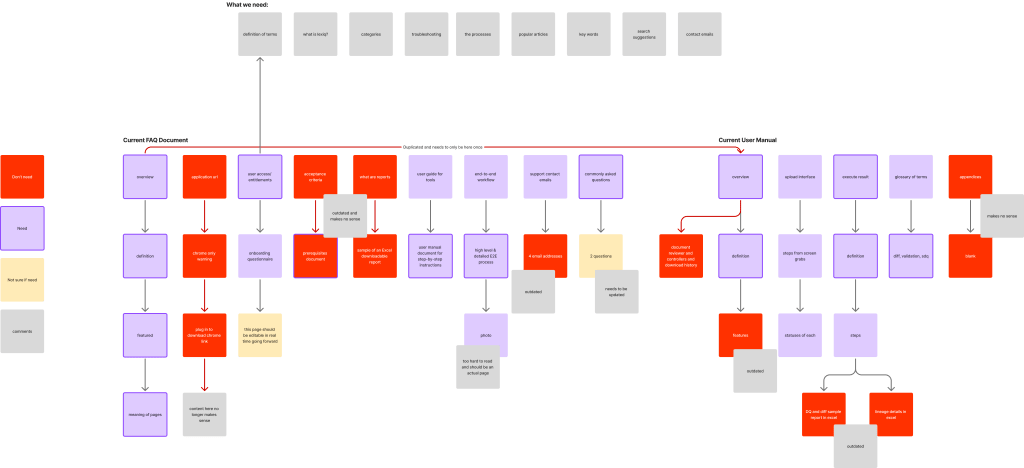
When I completed my audit, I met again with the Lead Admin where we reviewed each of the sticky notes I took note of in my personal white board session. We highlighted purple on the sticky notes that were necessary to keep in the new Help Center, marked red on sections we do not need to include because they are outdated, and added yellow stickies to document how we wanted the added changes and combined topics to appear. Example: “ETL process flow diagram” –> we can transfer this screenshot onto an actual page because it is too hard to read and understand.
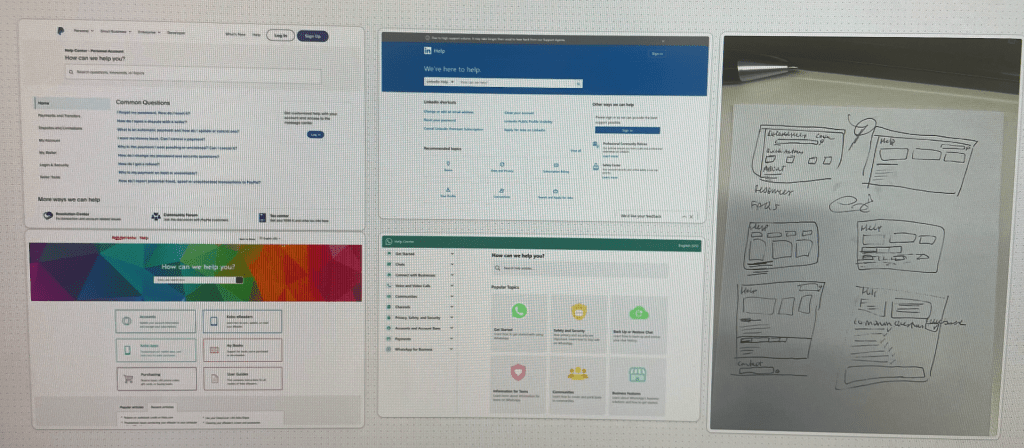
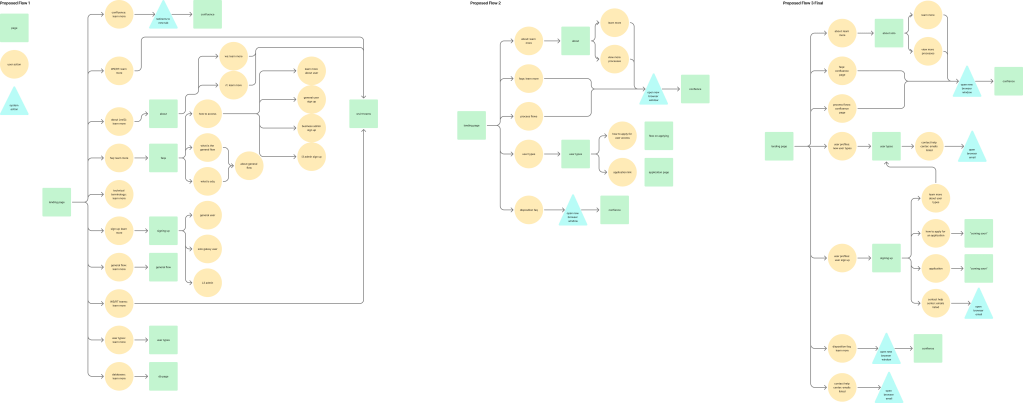
I did an audit on how our competitors laid out their Help Centers and used it as a point of reference. After, I did a crazy eight session and presented my ideas to the Admin team. We decided on one design then created a proposed help center user flow. After three audits of the flow (below), we agreed on a more simplified flow to help expedite a better process with the limited amount of developers onboarded in the team. After, we created a lo-fi design to double check that what we designed looks good, then a hi-fi design that had to be audited three different times after our usability testing with general users.
Design
I had two design audits with our General Users (5 new and 2 legacy) to get a better understanding of their pain points.
Version 1 & 2:
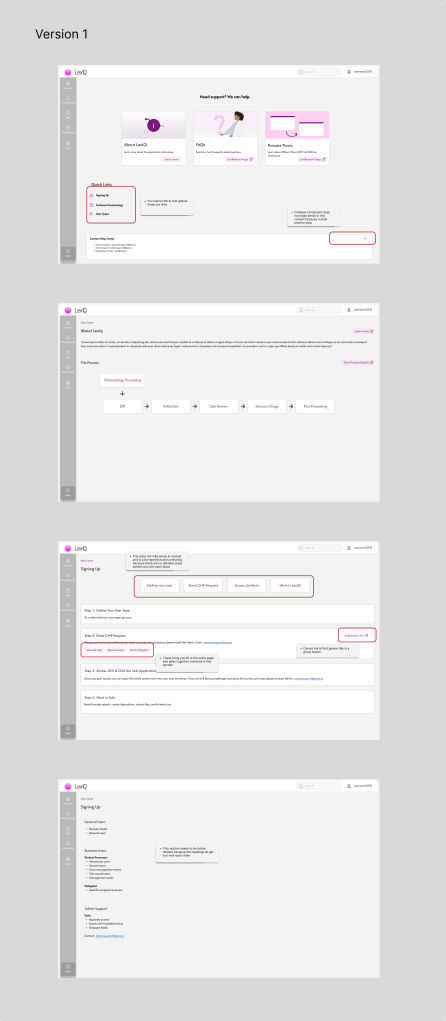
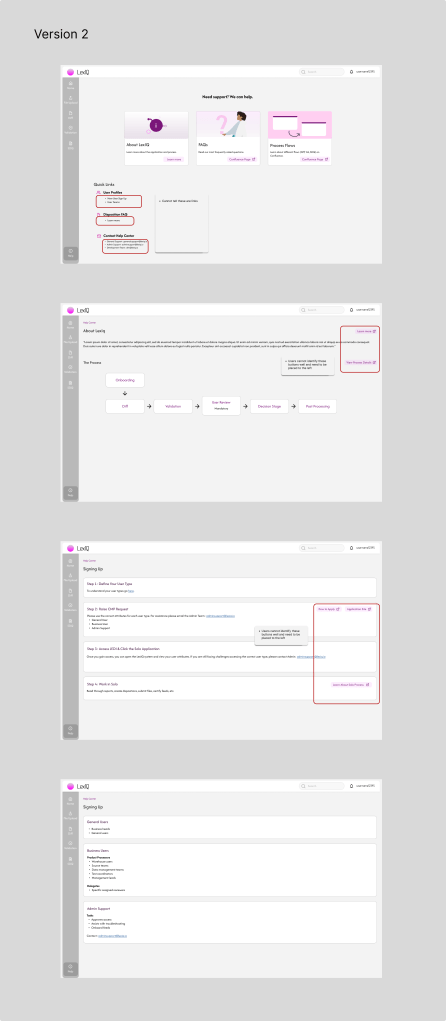
Research Phase 3
After, I had three research sessions with our General Users (5 new and 2 legacy) to get a better understanding of their pain points. 1. The first session was presented to the Admin team to see if we needed to address any major issues. We found several issues: links not easily identifiable, buttons causing cognitive overload, and important sections not easily divided visually. 2. The second session was with the General Users, where we found link identification issues and button placement issues. 3. The third and final review had link updates, buttons on the left side of the screen, more details for the process and tooltips, and other button changes. We came up with a final design.
Final Version
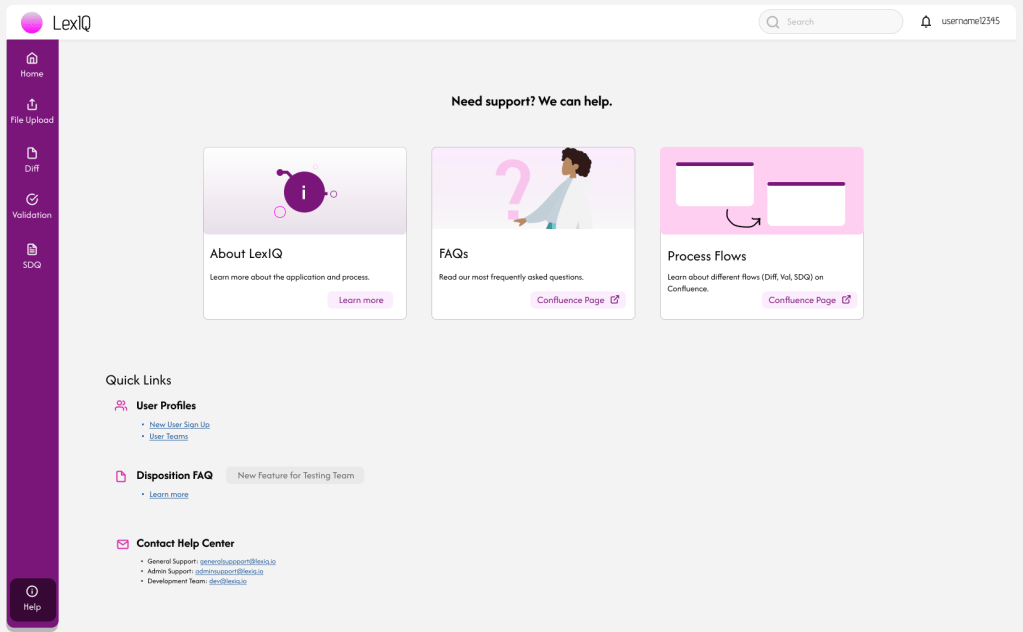
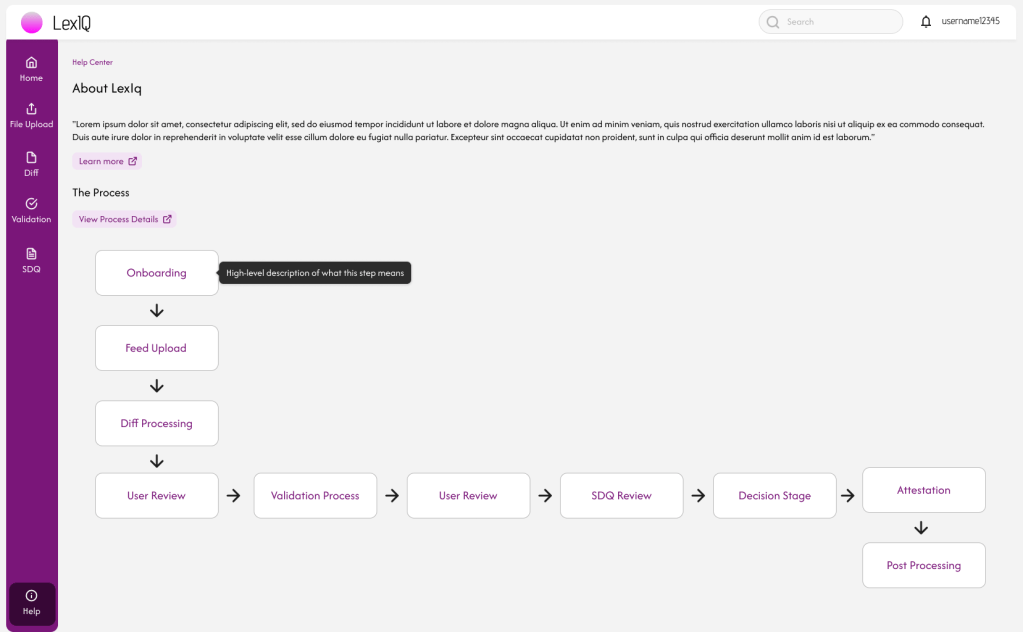
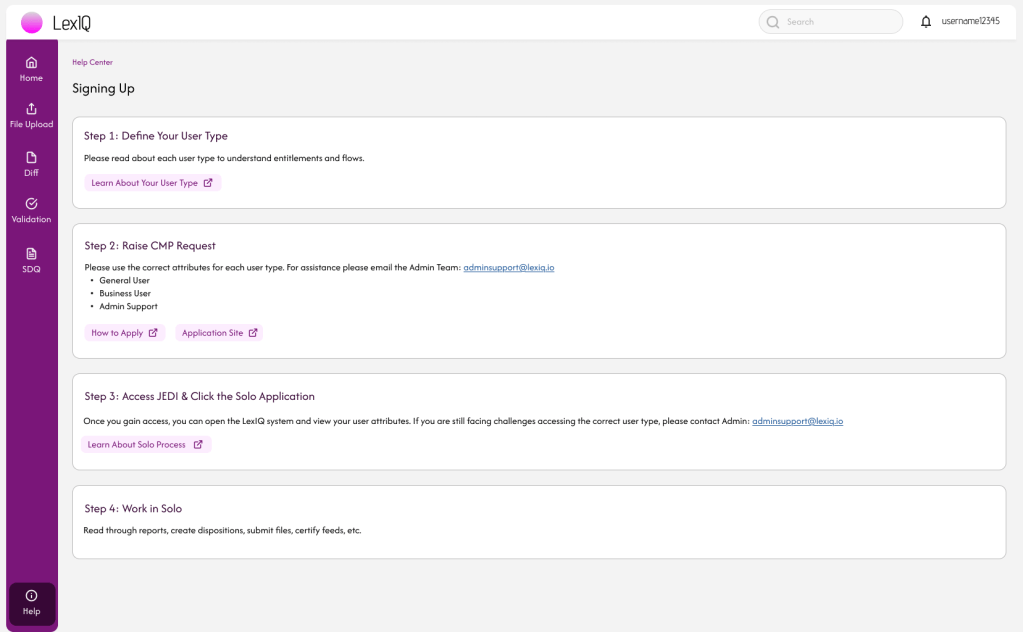
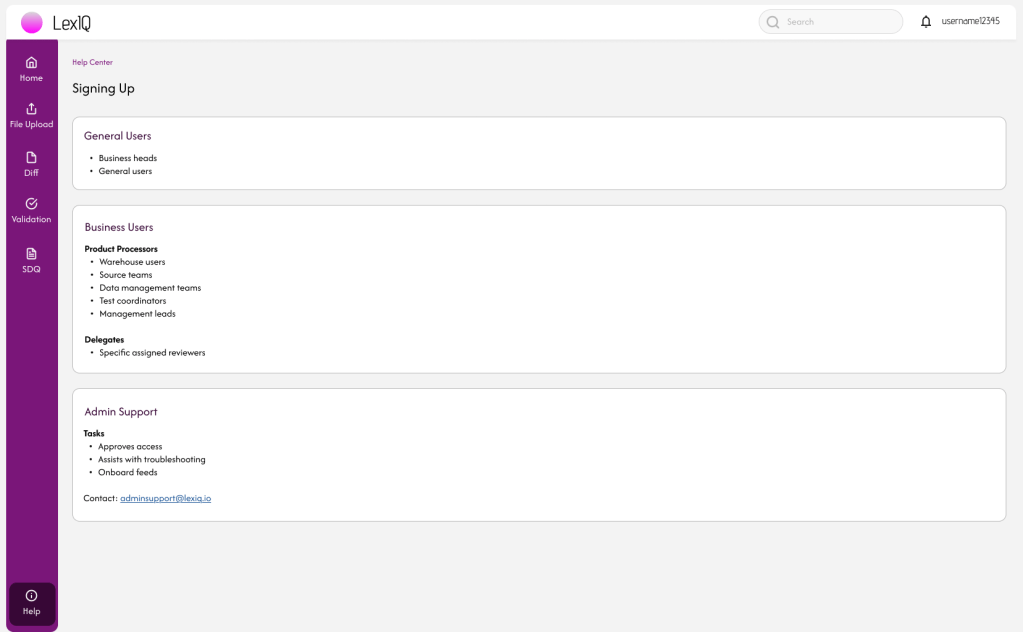
After the design was sent to the engineers to develop and push to live, I encouraged the (1) Admin team to advise users to utilize the Help Center to find their answers and (2) Development team to add a “feature announcement” modal for new logins to notify users of the new addition.
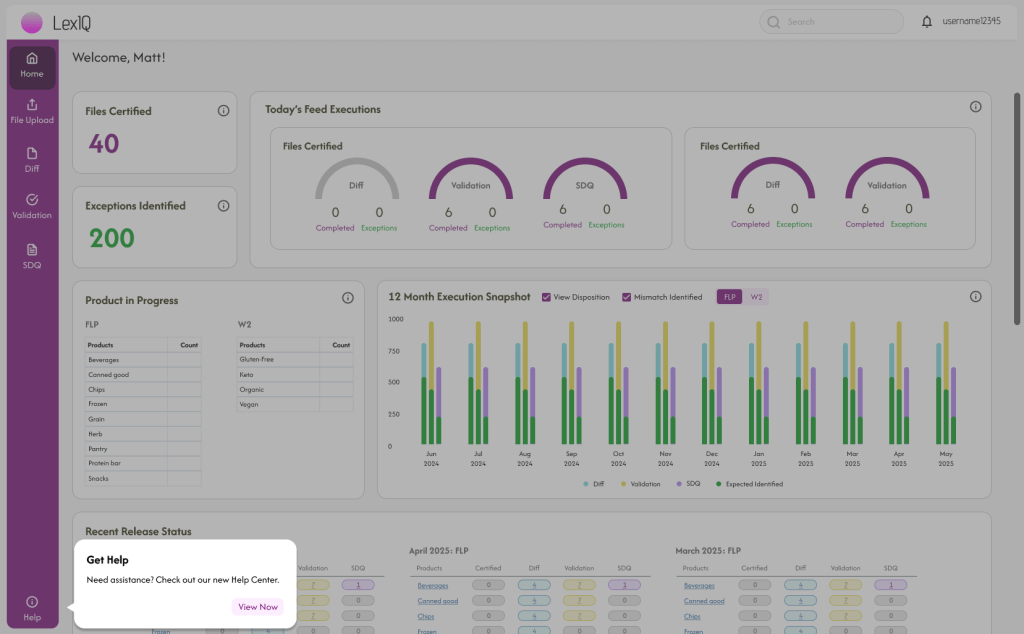
I then allowed a month to go by so I could collect data on my designs. We interviewed our Admin team to see if there have been any pitfalls or improvements in the number of requests from users a week. One Admin said that there were “not a lot of basic questions asked anymore.” Now they get around 9 a day. There was about a 87% decrease in the number of requests a day, 9 versus 70. That is significant, but still not less than 7, or 10%. We think that new users still need some assistance with onboarding and understanding some platform jargon.
Conclusion
With our new data, we can calculate that 9 requests a day x 1.5 hours = 13.5 hours a day x 260 days = 3,510 hours a year x $40 per hour, then we calculate $140,400 spent a year on costs or saving around $950,000 a year. Instead of hiring more Admin to assist in helping with an overwhelming amount of help requests, the organization can now reduce its workforce by about 50% up to 11 employees.
*Quantitative data estimated from initial interviews/ surveys with Admin during the research process below.
 BY ALEXA NICOLE